Explore
Transpond forms.

This page demonstrates Transpond's excellent embedded forms. This page will develop over time, and currently shows a simple Gated Content form that directs form signups to a downloads landing page.

Feel free to try the form out - you'll see how Transpond takes care of double opt-in, and then directs you to a page where you can choose which files to download.

Transpond provides analytics on these downloads, and also allows re-visits, so contacts can return to download more.

Gated Content Form

Form 1 - Gated Content with Download Landing Page

This is a Transpond Gated Content form that directs signups to a download landing page, featuring multiple files that can be downloaded.

Contacts filling this form in will be added to Capsule CRM, tagged, and Transpond Analytics are available to see which files were downloaded.

Download Landing Page

What contacts see after signing up

Once a contact completes the form and confirms their email via double opt-in, they're directed to a branded download landing page. The (very!) simple example below shows how Transpond presents multiple downloadable files in one place — each tracked individually so you can see exactly what was downloaded and by whom.
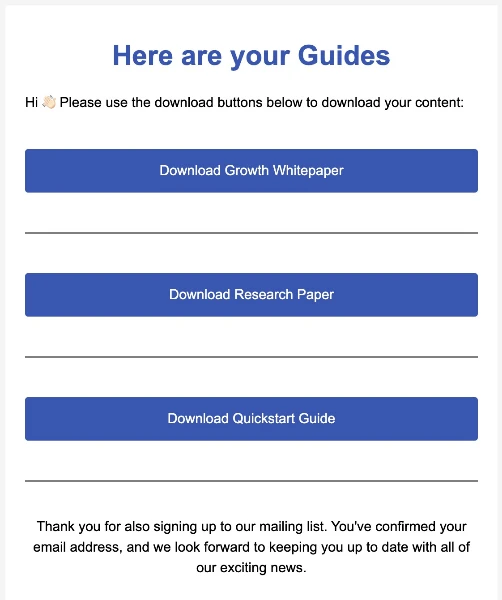
Example of a Transpond gated content landing page showing multiple download links

This landing page is fully customisable — branding, copy, and files are all configured within Transpond.

Gated content forms · Knowledge base
Download Analytics

Gated content form download analytics

Every file download is captured in Transpond's analytics dashboard. You can filter by file and search by email address to see exactly who downloaded what and when. Each row shows the download date and time, the contact's email address, the specific file they accessed, and a total download count — so you can tell at a glance whether a contact has returned to download additional files.

All Files
email@address.com
Download Date Email Address File Downloads
13/05/2026 17:09 2
13/05/2026 16:11 3
13/05/2026 16:09 2

Contact details have been redacted. Analytics are available per-form within Transpond.

Downloads can also trigger automations — for example, sending a follow-up email or notifying your sales team when a specific file is downloaded. This is covered in the next section.

Form options & analytics · Knowledge base
Automations

Turn every download into a workflow

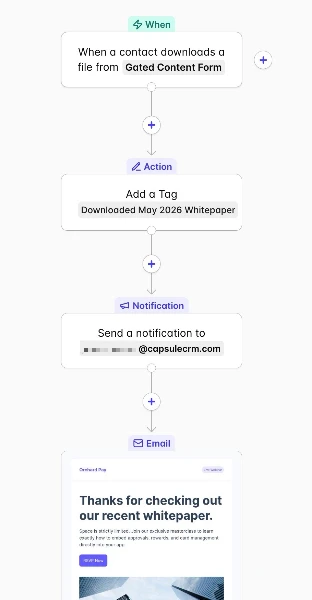
When a contact downloads a file from a Transpond Gated Content form, it can immediately kick off an automation — combining actions across both Transpond and Capsule CRM in a single flow.

Trigger
The automation fires the moment a contact downloads any file, or a specific file, from your Gated Content form.
Tag the contact in Capsule
A tag such as "Downloaded May 2026 Whitepaper" is automatically applied to the contact record in Capsule CRM, keeping your data clean and segmentable.
Notify your team
An internal notification can be sent — for example to a Sales email address — so your sales team knows immediately when a prospect has engaged with key content.
Send a follow-up email
Transpond can automatically send a branded follow-up email to the contact — thanking them for their interest and inviting them to take the next step, such as registering for a webinar.
Transpond automation flow triggered by a gated content download, showing tagging, notification, and follow-up email steps
How to use automations · Knowledge base
Need help?

Get support or explore the docs

The Transpond team are on hand to help. Reach out directly by email or browse the knowledge base to learn more about forms and everything else Transpond can do.